Smart Receipts: Expenses & Tax
- 4.5
- Rating
- 1.00M
- Installs
- Free
- Price

 Analysis by App-foxy
I usually notice the value of a receipt app only after a busy month has already created a mess. Receipts end up in email, coat pockets, camera rolls, and paper folders, while mileage notes are remembered too late to be useful. Smart Receipts: Expenses & Tax is designed for that exact problem. It is a free business app from REACTIVE APPS CORP. that brings receipt scanning, expense tracking, mileage records, tax organization, and bill management into one place.
After using it as a practical organizer rather than treating it like a full accounting system, I found its main appeal easy to understand: it reduces the number of small decisions I have to make later. Instead of asking myself where a purchase happened or what it was for, I can capture the information closer to the moment I spend the money. That sounds simple, but it matters when several weeks of business activity need to be reconstructed.
How I would decide whether it fits my workflow
The first question is not whether receipt scanning sounds useful. The better question is where your financial records currently break down. If you are a freelancer, consultant, field worker, small-business owner, or employee who regularly submits expenses, the app is most useful when your problem is scattered evidence. It can serve as a working layer between the purchase itself and the final report or tax preparation process.
You May Also Like

 Blood Strike: 2.5 Anniversary
Blood Strike’s Loadouts Turn Every Drop Into a Tactical Gamble
A close look at Blood Strike’s custom loadouts: how fast access to signature weapons reshapes its battle royale rhythm, rewards preparation, and narrows the gap between fights.

 Pandora - Music & Podcasts
Pandora’s Music Is Easy to Start, but Harder to Recover
Pandora’s strength is its low-effort path from a seed to a station. Its weak spot is how much confidence it asks you to place in connection, setup, and quiet recovery.

 8 Ball Pool
 Is Built on Rivalries, Rematches, and Routine
A close look at the rivalries, rematches, shared routines, and unanswered safety questions that turn a quick pool match into a persistent mobile community.

 Samsung Music
’s Quiet Strength Is Playing What You Already Own
Its reach comes less from spectacle than from dependable access to a personal library. That simplicity is both the app’s strongest retention engine and its ceiling.

 AccuWeather: Weather Radar
AccuWeather Review: A Quick, Clear Forecast for Everyday Decisions
For everyday plans, the best forecast is the one you can understand quickly. AccuWeather makes rain timing, radar, and local conditions easy to act on, with a few trade-offs.

 Hill Climb Racing
Why Hill Climb Racing Still Turns Crashes Into One More Run
A tiny car, a bumpy hill and one more upgrade: Hill Climb Racing keeps resurfacing because its simple chaos makes every near-miss feel personal.
More From Our News Desk



I would also consider how much detail you need. Someone who only wants a folder for photographed receipts may prefer a simpler camera-and-cloud routine. Someone who needs invoices, bank reconciliation, payroll, inventory, or formal bookkeeping should look toward dedicated accounting software instead. Smart Receipts: Expenses & Tax sits more comfortably in the middle: more purposeful than a photo folder, but not something I would automatically treat as a replacement for a complete financial platform.
The app has been available since October 11, 2011, which gives it a long history in a category where many tools come and go. Its current store presence shows an average rating of 4.5 from around ten thousand ratings, with more than a million installs. I read those figures as a sign that it has found a durable audience, not as proof that every workflow will feel effortless. Receipt habits vary widely, and the right choice depends on whether you value quick capture, structured records, or deeper accounting control.
What I look for before committing
For me, the most important test is the moment immediately after paying. If recording an expense takes too many steps, I will postpone it, and postponed records become unreliable. A useful routine is to photograph the receipt while it is still on the table, add a short purpose note, and classify it before moving on. That small habit is more valuable than trying to remember a month of purchases in one sitting.
The second test is retrieval. A receipt organizer should help me answer practical questions later: what did I buy, when did I buy it, why was it business-related, and where is the supporting image? The app makes sense when you want those details kept together rather than split between a gallery, notes app, spreadsheet, and email inbox.
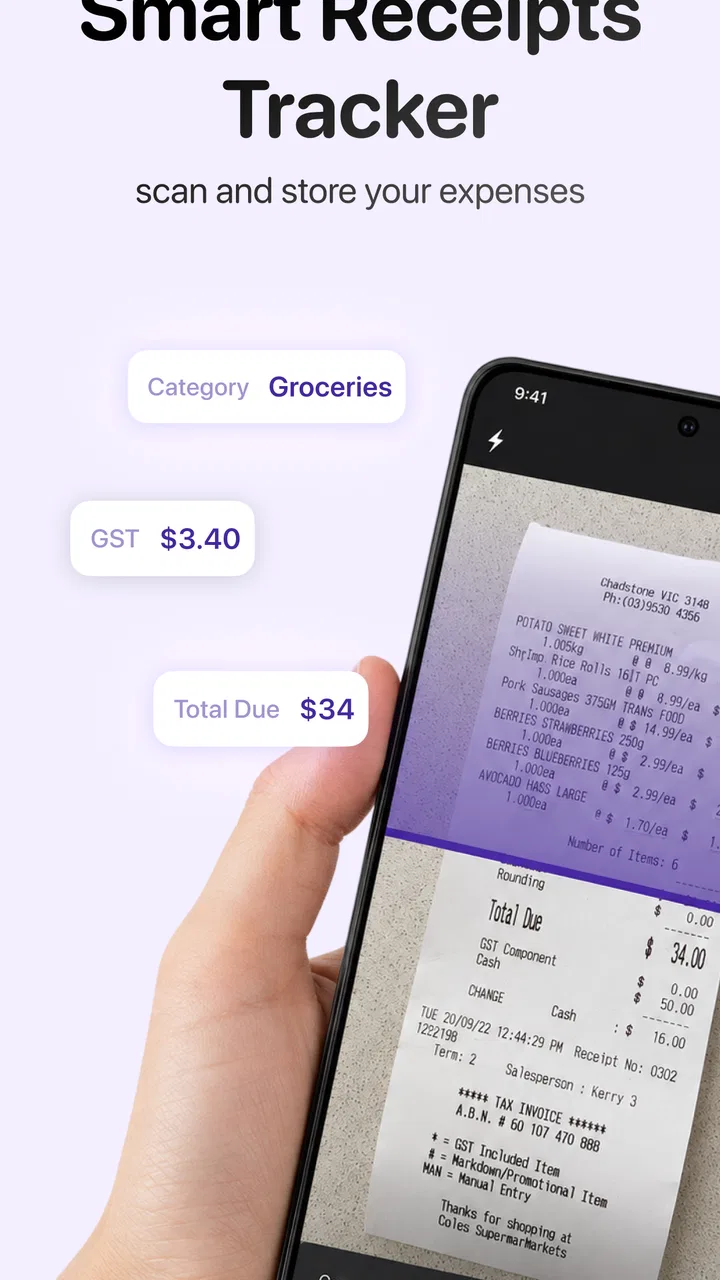
The third test is tolerance for correction. Scanning tools are helpful, but no optical reader should be treated as infallible. Receipts can be folded, faded, poorly printed, or crowded with unrelated information. I would always review the merchant, date, total, and tax-related fields before relying on a record. The fastest workflow is not “scan and forget”; it is “scan, glance, correct, and move on.”
A realistic day with the app
Imagine I spend a morning visiting clients, pay for parking, buy lunch during a work meeting, and purchase supplies on the way back. Instead of putting every receipt into my wallet, I capture each one as the day progresses. For mileage, I record the trip while the route is fresh rather than trying to estimate it at the end of the week. In the evening, I can review the entries and separate personal spending from business activity before the details blur together.
That workflow is especially useful for people whose work happens away from a desk. A photographer, repair technician, sales representative, or independent contractor may not need a complex accounting dashboard while traveling. They need a dependable place to put supporting records. The app’s combination of expenses, mileage, tax-related organization, and bills gives those users a more coherent routine than a loose collection of phone photos.
There is also a less obvious benefit to capturing context immediately: it protects against ambiguous receipts. A receipt may show a store and total but not explain whether the purchase was for a client, a project, or personal use. Adding that context at the time of purchase can save a frustrating investigation later. I consider this one of the strongest reasons to use a structured receipt app instead of simply photographing documents.
Where Smart Receipts: Expenses & Tax is strongest
The app wins when the real problem is consistency. It gives receipt capture a clear place inside a broader expense routine, so the user is encouraged to record more than an image. That matters because a receipt without context is only partial evidence. The combination of expense, mileage, tax, business, finance, and bill organization makes it more suitable for recurring administrative work than a basic scanning utility.
I particularly like the way this approach can support a weekly review. Rather than opening a spreadsheet and manually matching rows to images, I can work through the records in one dedicated environment. A weekly check also exposes missing entries while the memory of the purchase is still reasonably fresh. This is a better habit than waiting until tax preparation or reimbursement time, when every forgotten detail becomes harder to recover.
Another strength is its usefulness across different levels of formality. A person who is just beginning to track freelance expenses can start with simple receipt capture and mileage records. A more experienced user can use the same routine to maintain cleaner supporting documentation. The app does not require every user to begin with an elaborate accounting process, which lowers the barrier for people who know they need better records but dislike financial administration.
The free entry point also makes experimentation easier. I can try the workflow before deciding whether it deserves a permanent place in my routine. However, “free” does not mean every possible capability is without cost: the app includes in-app purchases ranging from $2.99 to $134.99 per item. I would therefore inspect the available purchase options inside the app and decide based on the features I actually need, rather than assuming the free installation defines the entire cost.
Small workflow choices that make a big difference
My first practical tip is to create a capture rule: never leave a receipt unprocessed overnight unless there is a genuine reason. That does not mean completing a full financial review immediately. It means recording the image and enough context to identify the purchase. The distinction is important because a five-second capture habit is realistic, while promising to reconstruct every detail later is not.
My second tip is to use mileage records as a contemporaneous log, not as a memory exercise. If a trip has a business purpose, note that purpose near the time of travel. A mileage number without an explanation may be less useful than a slightly less polished record that clearly connects the journey to work. This is one of the places where the app’s broader organization is more valuable than scanning alone.
My third tip is to reserve a regular review for corrections. Scanning can speed up data entry, but review protects accuracy. I would pay special attention to totals, dates, tax amounts, and any receipt where the image is dark or the print is cramped. Correcting a handful of questionable entries each week is far easier than checking a large archive after the information has become unfamiliar.
A fourth useful habit is to separate “proof of purchase” from “business justification” in my thinking. The receipt image proves that a transaction happened; a note or category explains why it belongs in a business record. Keeping both ideas together makes the archive more useful for reimbursement discussions and tax preparation. It also reduces the temptation to treat every receipt as automatically deductible or business-related.
What may feel less convenient
The same structure that makes the app useful can make it feel heavier than a camera app. If I only need to save a receipt for a return, I may not want to classify it, add context, or maintain it as part of an expense system. The app is better suited to people who want an ongoing record than to someone who needs a temporary image locker.
There is also a human-review cost. No scanning workflow removes the need to check important information. A user who expects every receipt to become a perfect financial entry without supervision may be disappointed. I would treat automated reading as an assistant that reduces typing, not as an accountant making final decisions.
Tax organization deserves the same caution. The app can help gather and arrange information, but personal tax rules depend on location, profession, and circumstances. I would use the records as organized evidence and preparation material, then apply the appropriate rules or consult a qualified professional when the situation is complicated. That is a sensible boundary for any expense organizer.
When another type of app may be a better fit
If your main need is formal bookkeeping, a dedicated accounting service may be the better choice. Those products are generally designed around ledgers, financial reporting, reconciliation, and broader business administration. Smart Receipts: Expenses & Tax can help supply organized expense evidence, but I would not choose it solely because I expect it to replace every accounting function.
If your routine is limited to submitting occasional expenses to an employer, an employer-provided reimbursement system may be more efficient. Such systems often define the required fields and approval process, while a personal organizer leaves you responsible for deciding how to structure the record. In that situation, the app can still help preserve receipts, but it may add a second place to maintain information.
A spreadsheet can also remain the right alternative for users who want complete control over columns, formulas, and custom reporting. I have used spreadsheets for this kind of work, and they are flexible. Their weakness is that images, mileage notes, and supporting context often become awkward to manage. The trade-off is clear: a spreadsheet offers customization, while this app offers a more focused capture-and-organize workflow.
Cloud storage is another familiar alternative. Saving receipt photos in folders is easy to understand and may be enough for very light use. The problem appears when I need to search by expense purpose, connect a trip to a business activity, or review records consistently. A folder preserves documents, but it does not automatically create a useful habit around them.
For users who already rely on a specialized mileage tracker, accounting platform, and document scanner, adding another app may create duplication. Before switching, I would list the exact tasks I want to improve and check whether this app replaces a weak point or merely overlaps with tools that already work. Consolidation is helpful only when it reduces friction instead of moving the same work into another interface.
The cost of changing your routine
Switching to any receipt organizer has a hidden cost: old records need attention, and new habits need repetition. I would not begin by importing or reorganizing an entire archive. A better test is to start with current expenses for a short period, using the app on real purchases and mileage entries. That quickly reveals whether capture feels natural and whether the review process is manageable.
I would also decide what belongs in the app before filling it with everything. Business receipts, work travel, recurring bills, and tax-relevant documents are logical starting points. Personal shopping receipts with no future use may only create noise. A focused archive is easier to search and review than a complete photographic history of every purchase.
The financial transition deserves attention too. The app is free to install, but optional in-app purchases range from $2.99 to $134.99 per item. I would avoid paying simply because a premium option exists. First I would identify the specific limitation affecting my workflow, then decide whether the purchase solves it often enough to justify the expense. That approach is particularly important for occasional users who may never recover the value of an advanced plan.
Privacy and record retention are also part of the switching decision, even without turning the review into a policy summary. Receipts can contain sensitive business and personal information, so I would read the app’s current permissions and privacy terms before storing a large archive. I would also keep important originals or backup records according to my own business requirements rather than assuming one mobile app should be the only copy.
Finally, I would make an exit plan. Before depending on a new organizer for tax or reimbursement work, I want to know how I can retrieve my records in a usable form and preserve the underlying images. This is not a criticism unique to this app; it is good practice whenever financial documents move into a digital service. The best workflow is one that remains understandable even if my tools change later.
My recommendation for different kinds of users
I recommend Smart Receipts: Expenses & Tax to freelancers, mobile workers, and small-business users who repeatedly lose time collecting receipts, mileage details, and bill information. It is especially appealing if you want one focused place for capture and organization without immediately committing to a full accounting platform. The Everyone content rating also makes it broadly accessible as a general business utility, though the usefulness still depends on the user’s willingness to review records carefully.
I would recommend it less strongly to someone who only needs occasional document photos, already has a reliable reimbursement system, or requires formal accounting features beyond expense organization. In those cases, a simpler storage tool or a dedicated accounting product may create less overlap. The app is not a universal answer; its value appears when scattered financial evidence is the recurring problem.
For a friend deciding today, I would suggest starting with a small, real workflow: capture current receipts, record a few work trips, add the reason for each business expense, and perform a weekly correction review. If that routine feels easier than the old combination of paper, photos, and spreadsheets, the app is probably earning its place. If it feels like extra data entry for records you rarely use, switching may not be worthwhile.
My overall view is positive because the app focuses on a practical weakness that many business users share: remembering the details after the transaction is over. Its long availability, strong average rating, and broad adoption support its credibility, while the free starting point makes testing straightforward. Still, I would keep expectations realistic. It helps organize evidence; it does not remove judgment, tax responsibility, or the need to verify scanned information.
My clear recommendation: use it as a disciplined receipt-and-mileage companion, not as a substitute for every financial tool. Capture promptly, add business context, review questionable scans, and choose paid options only when they solve a repeated problem. Used that way, Smart Receipts: Expenses & Tax can turn a scattered expense routine into a manageable one without forcing every user into a heavyweight accounting system.
FAQs for Smart Receipts: Expenses & Tax
01What is Smart Receipts: Expenses & Tax used for?
Smart Receipts: Expenses & Tax is designed to help you record, organize, and manage business or personal expenses from your mobile device. You can photograph paper receipts, enter cash purchases manually, categorize spending, and create expense reports. It can be useful for freelancers, employees, travelers, and anyone who needs a clearer overview of receipts and deductible expenses.
02Can I scan receipts with Smart Receipts: Expenses & Tax?
Yes, the app allows you to capture receipts using your device’s camera and store digital copies for later reference. Depending on the receipt quality and lighting, text recognition may help reduce manual data entry, although you should still check dates, totals, taxes, and merchant details for accuracy. Keeping the original receipts may also be advisable for official tax or reimbursement purposes.
03Can Smart Receipts create expense reports for work or tax purposes?
Smart Receipts: Expenses & Tax can organize recorded purchases into expense reports and export the information for sharing, reimbursement, accounting, or personal recordkeeping. Reports may include details such as categories, dates, merchants, taxes, and totals. However, the app does not replace professional tax advice, and you should confirm that exported reports meet your employer’s or local tax authority’s requirements.
04Is Smart Receipts: Expenses & Tax free to use?
The app may offer a free version or trial with access to basic receipt and expense-management tools, while advanced features can require a subscription or in-app purchase. Available pricing, limits, export options, cloud features, and premium tools may vary between Android and iOS. Before downloading or subscribing, review the current store listing and payment terms carefully.
05Is my financial and receipt information secure in the app?
Because Smart Receipts: Expenses & Tax can contain sensitive information such as purchase history, business expenses, tax details, and receipt images, privacy should be considered before use. Review the app’s current privacy policy to understand how data is stored, synchronized, processed, and shared. Use a device lock, keep the application updated, and avoid uploading documents containing unnecessary personal information.
Pros
- Quick receipt scanning with automatic data extraction
- Useful expense categories for organizing business spending
- Supports PDF and CSV exports for reports and bookkeeping
- Cloud backup helps protect records when changing devices
- Customizable tax rates and mileage tracking are available
Cons
- Some advanced features require a paid subscription
- OCR accuracy can drop with faded or poorly lit receipts
- The interface may feel crowded for first-time users
- Receipt organization can take time for users with many expenses
- Cloud features may require an account and stable internet access

Smart Receipts: Expenses & Tax
Gallery